
Shashanka Doddamani
Tiva ARM Cortex Activity Tracker and Server Data Logging


Introduction:
In today’s world wearable technology is changing the life of people like never before. Range of activity trackers are available with different functionality. In this project a smart sleep alert system capable of live data streaming to a third party server has been explored. The system uses a three axis accelerometer to track the user’s activity and stream the data to the computer later to the server. Based on the previous readings of accelerometer the controller detects whether the user is idle or awake. The system will alarm the user until he/she performs a predefined hand gesture, thereby ensuring users minimum activity and conclude that he/she is awake. This device can be used while driving, working, and during the time people get sleep without their notice.
GITHUB LINK: https://github.com/shashankad/Tiva-ARM-Cortex-Activity-Tracker-and-Server-Data-Logging.git
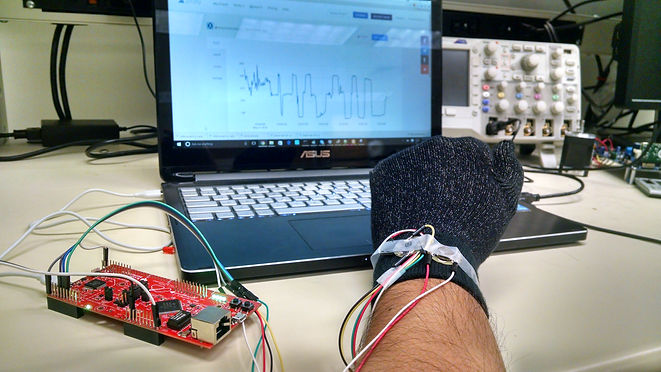
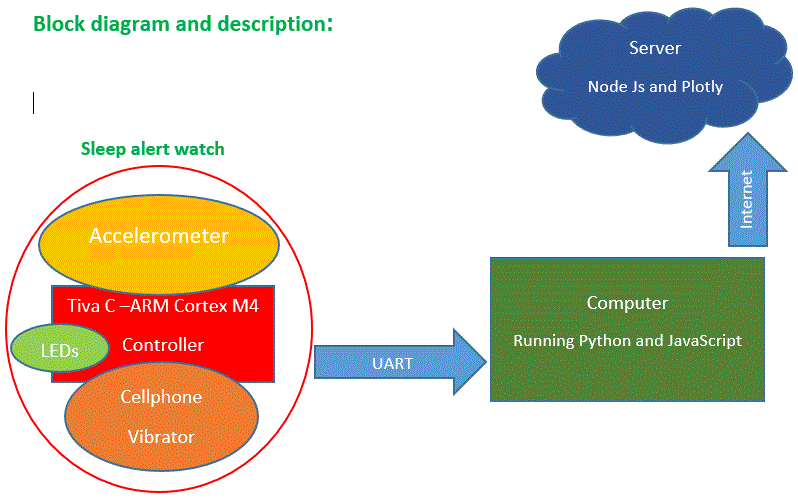
User will be wearing sleep alert watch on his/her wrist. It consists of Tiva C series ARM cortex M4F TM4C1294 controller. Accelerometer is connected to the controller through its ADC port. Three ADC channels have been used to read the X, Y, and Z axis of the accelerometer. Cell phone vibrator has been connected to the GPIO pin of controller. Four LEDs have been used for indication.
Connections have been made as follows:
// An Accelerometer is connected to ADC input as follows
//ADC :AIN0 = CH0 = PE3 connected to x - axis of accelerometer
// AIN1 = CH1 = PE2 connected to y - axis of accelerometer
// AIN2 = CH2 = PE1 connected to z - axis of accelerometer
//LEDs : LED1 = PN1
// LED2 = PN0
// LED3 = PF4
// LED4 = PF0
//Vibrator or Vibmotor: PN4 connected to vibmotor
//Accelerometer : +3.3V supply & gnd
Algorithm running in the controller keeps track of accelerometer readings of pervious cycles and if they are same it triggers the alarm by setting the LEDs and vibrator ON. Now the user has to perform had gesture to switch off the alarm. Here a simple wrist rotation towards the left followed by rotation towards left has been choose as unlocking hand gesture.
A UART communication of 115200 baudrate has been established with the computer running windows 10. A python script has been written to plot the x, y, z axis readings of accelerometer. Further, in another setting only x axis value has been chosen to be sent to the computer. A JavaScript running in the computer uses Node Js platform to read the data from the UART and send it to the third party server named plotly. Plotly is a online analytics and data visualization tool, its easy interface makes it simple to store the data and analyze.
Setup:
Output:
Figure 1. Python Plot of all 3 axis
Figure 2. Real-time data in server Accelerometer reading v/s time
Figure 3. Terminal output showing gesture recognition
Here all the peaks occur when user has rotated his/her wrist 90o towards left and all the dips occur when user rotated his/her wrist 90o towards right.
Suggestions for improvement:
Now the communication from the controller happens through UART, it can be made suing Bluethooth or any other wireless technology. Gesture unlocking can be improved to be used in gesture to voice assistant systems, gesture based games, or gesture based password system etc. Adding more sensors like heartbeat sensor, temperature sensor will improve the usefulness of the device.